Portfolio Website Builder for Developers
A developer portfolio should connect code to a problem you solved. PortfolioBuild gives you layouts for project summaries, experience and links, so you can explain your work without building another website from scratch.
Choose projects that reveal how you think
Pick a small set of projects that support the role you want. For frontend work, show interaction design, responsive behavior and accessibility decisions. For backend work, explain the data model, API boundaries, validation and failure handling. A full-stack project can connect those choices into one user journey.
A deployed demo is useful when it works, but it is not the only form of evidence. For infrastructure or private systems, use an architecture diagram, a sanitized code sample or an explanation of a specific technical tradeoff. Never publish an employer’s code or credentials to make a portfolio look complete.
- State the user problem before listing the stack.
- Describe what you implemented and what came from a library or team.
- Link to a working demo, repository or supporting artifact.
- Include limitations, tradeoffs and what you would improve next.
Make GitHub links worth opening
A repository should have a readable README, setup instructions and enough context for someone outside the project. Include example configuration without secrets, a license where appropriate and a screenshot or API usage example. Check the link while signed out.
If your portfolio says “tested,” point to the behavior covered. If it says “fast,” explain how you measured performance and under what conditions. Leave out percentages you cannot reproduce. A precise account of an ordinary engineering decision is stronger evidence than a vague superlative.
Illustrative project description: “I built a booking API with PostgreSQL to prevent overlapping reservations. The service validates date ranges and uses a transaction for booking creation. Integration tests cover concurrent requests. The demo uses synthetic bookings and does not process payments.”
Adapt the portfolio to your experience level
For a junior developer, include one project you understand end to end and a short explanation of how you debugged a problem. A tutorial extension can be useful if you credit the tutorial and explain your additions. Do not present copied starter code as an original system.
For an experienced developer, focus on ownership and constraints: the part of a migration you led, an operational issue you resolved or a design decision you can discuss publicly. A concise account of a system change often communicates more than an exhaustive tool list.
Write for a reader before writing for a keyword
Use a specific headline such as “Backend developer working with Python and PostgreSQL” if it reflects your work. Follow it with a brief introduction, featured projects, relevant experience and contact details. Avoid animated terminal intros that prevent a reader from reaching the projects.
PortfolioBuild keeps content separate from template selection. You can import CV details, edit the project sections and switch layouts as your work develops. Test the finished page on a narrow screen and open every external link before publishing.
A developer portfolio example to explore
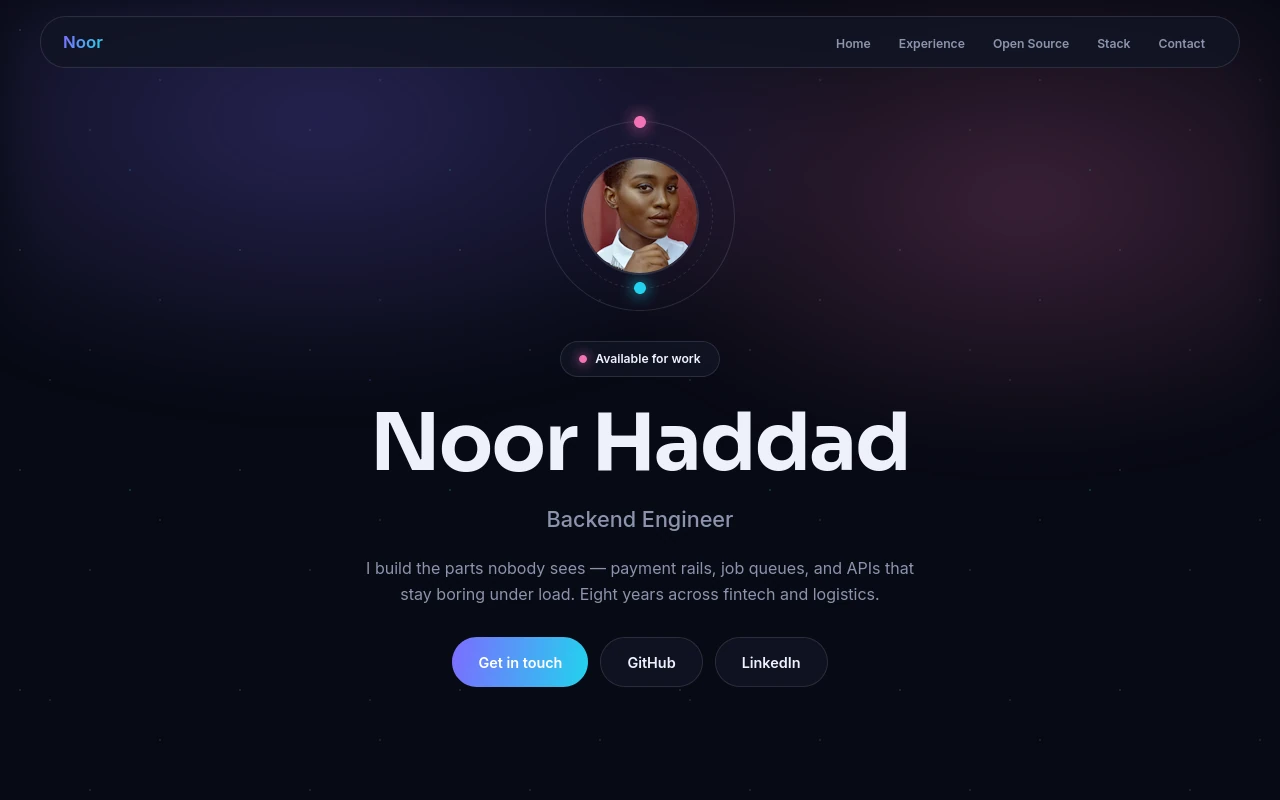
Noor Haddad’s backend engineer demo uses the Developer Orbit template. Look at how a role-led introduction gives context to technical work. The sample identity and experience are demonstration content, not a customer endorsement.
Before you publish
- Repositories have clear READMEs and safe example configuration.
- Every project distinguishes my work from library, tutorial and team contributions.
- Technical claims are backed by code, tests or an explanation.
- There is a visible contact link and a readable mobile layout.
Frequently asked questions
Do I need to code my own developer portfolio?
No. You can use a builder for the presentation and link to code you want evaluated. If you are applying for a role where the portfolio site itself demonstrates relevant skills, explain which parts you implemented.
Can I link GitHub repositories and live demos?
Yes. Add relevant project and social links in your portfolio sections. Check that the destination is public and that a demo does not require private credentials.
Keep building your portfolio
Build a portfolio around your work
Choose a template, import your CV if you have one, and edit your projects. Free includes one private draft. Entry is $2/month for one published portfolio; Pro is $5/month for up to five. Both paid plans support your own domain; domain registration is separate.